---
title: Layouts and Pages
description: Learn how to create your first pages and layouts, and link between them with the Link component.
url: "https://nextjs.org/docs/app/getting-started/layouts-and-pages"
version: 16.2.2
lastUpdated: 2026-04-02
prerequisites:
- "Getting Started: /docs/app/getting-started"
related:
- app/getting-started/linking-and-navigating
- app/api-reference/file-conventions/layout
- app/api-reference/file-conventions/page
- app/api-reference/components/link
- app/api-reference/file-conventions/dynamic-routes
---
Next.js uses **file-system based routing**, meaning you can use folders and files to define routes. This page will guide you through how to create layouts and pages, and link between them.
## Creating a page
A **page** is UI that is rendered on a specific route. To create a page, add a [`page` file](/docs/app/api-reference/file-conventions/page) inside the `app` directory and default export a React component. For example, to create an index page (`/`):

```tsx filename="app/page.tsx" switcher
export default function Page() {
return
}
```
## Creating a layout
A layout is UI that is **shared** between multiple pages. On navigation, layouts preserve state, remain interactive, and do not rerender.
You can define a layout by default exporting a React component from a [`layout` file](/docs/app/api-reference/file-conventions/layout). The component should accept a `children` prop which can be a page or another [layout](#nesting-layouts).
For example, to create a layout that accepts your index page as child, add a `layout` file inside the `app` directory:
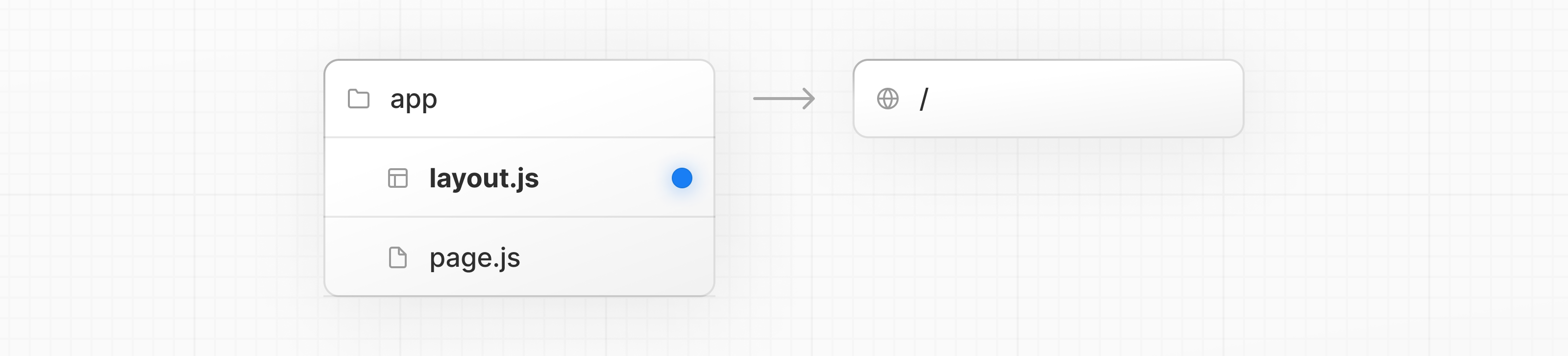
```tsx filename="app/layout.tsx" switcher
export default function DashboardLayout({
children,
}: {
children: React.ReactNode
}) {
return (
{/* Layout UI */}
{/* Place children where you want to render a page or nested layout */}
{children}
)
}
```
```jsx filename="app/layout.js" switcher
export default function DashboardLayout({ children }) {
return (
{/* Layout UI */}
{/* Place children where you want to render a page or nested layout */}
{children}
)
}
```
The layout above is called a [root layout](/docs/app/api-reference/file-conventions/layout#root-layout) because it's defined at the root of the `app` directory. The root layout is **required** and must contain `html` and `body` tags.
## Creating a nested route
A nested route is a route composed of multiple URL segments. For example, the `/blog/[slug]` route is composed of three segments:
* `/` (Root Segment)
* `blog` (Segment)
* `[slug]` (Leaf Segment)
In Next.js:
* **Folders** are used to define the route segments that map to URL segments.
* **Files** (like `page` and `layout`) are used to create UI that is shown for a segment.
To create nested routes, you can nest folders inside each other. For example, to add a route for `/blog`, create a folder called `blog` in the `app` directory. Then, to make `/blog` publicly accessible, add a `page.tsx` file:
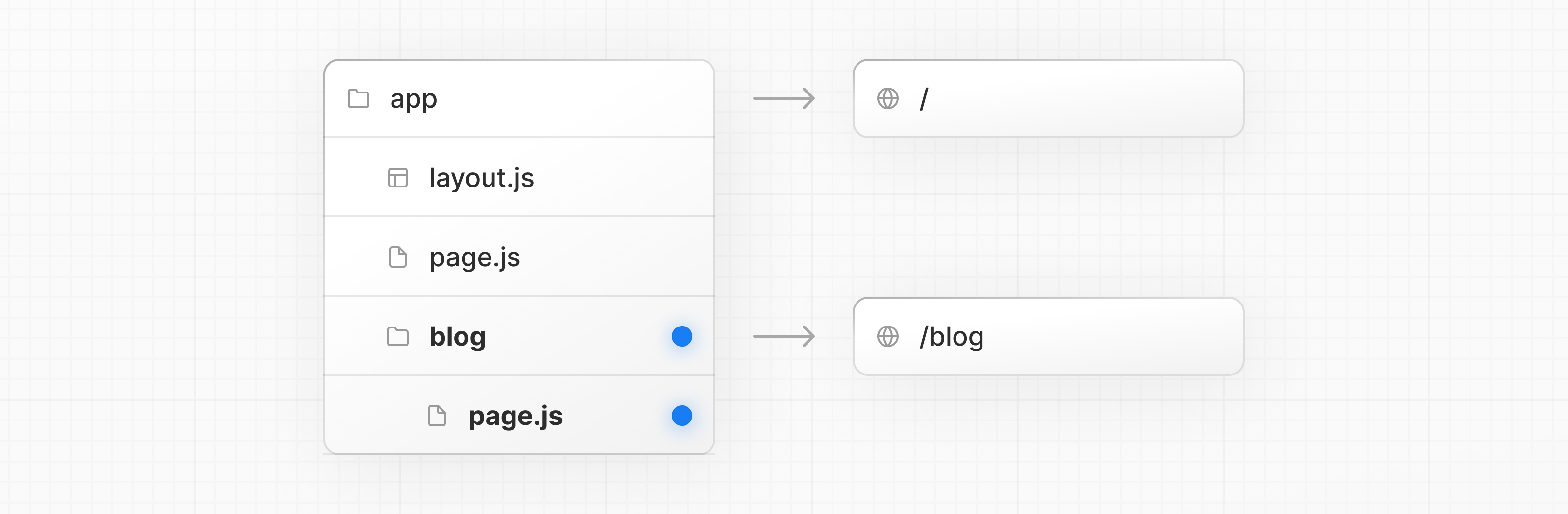
```tsx filename="app/blog/page.tsx" switcher
// Dummy imports
import { getPosts } from '@/lib/posts'
import { Post } from '@/ui/post'
export default async function Page() {
const posts = await getPosts()
return (
{posts.map((post) => (
))}
)
}
```
```jsx filename="app/blog/page.js" switcher
// Dummy imports
import { getPosts } from '@/lib/posts'
import { Post } from '@/ui/post'
export default async function Page() {
const posts = await getPosts()
return (
{posts.map((post) => (
))}
)
}
```
You can continue nesting folders to create nested routes. For example, to create a route for a specific blog post, create a new `[slug]` folder inside `blog` and add a `page` file:
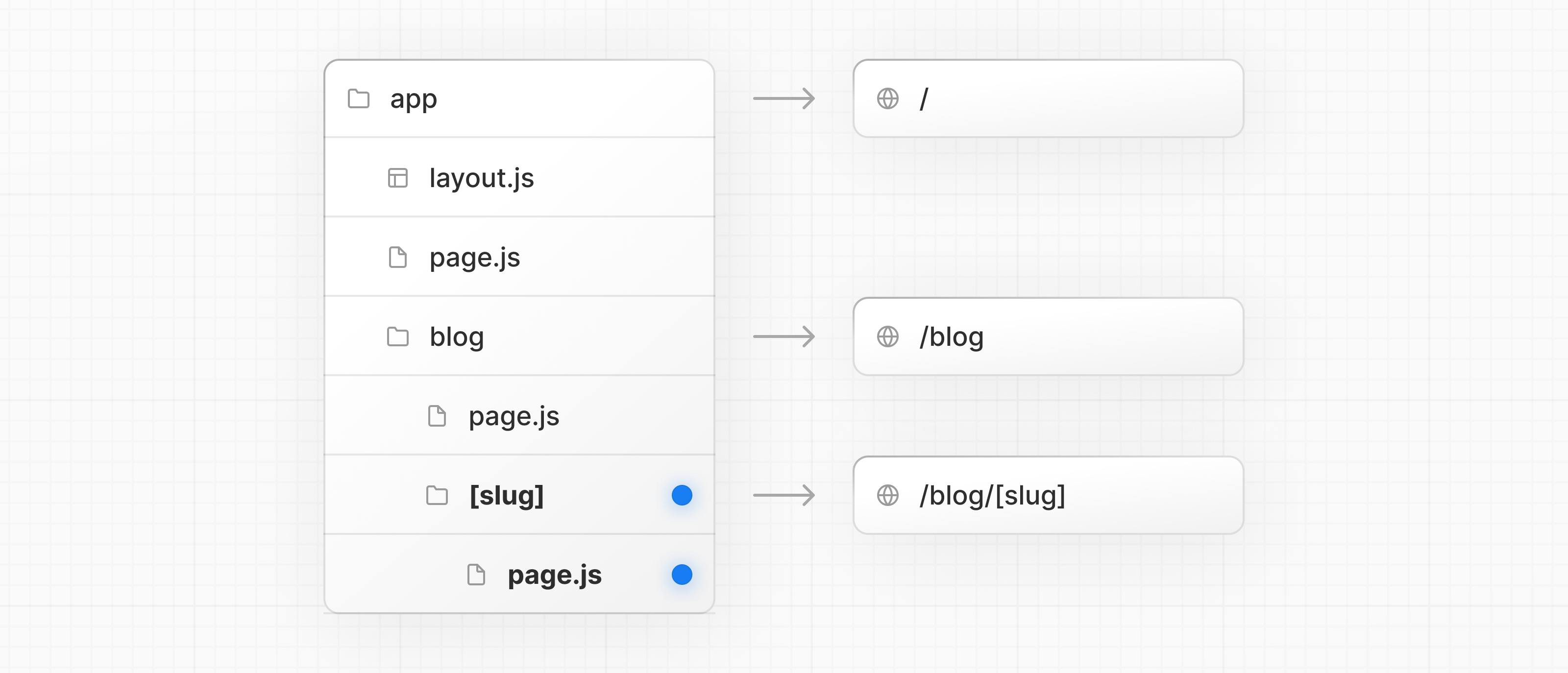
```tsx filename="app/blog/[slug]/page.tsx" switcher
function generateStaticParams() {}
export default function Page() {
return
Hello, Blog Post Page!
}
```
```jsx filename="app/blog/[slug]/page.js" switcher
function generateStaticParams() {}
export default function Page() {
return
Hello, Blog Post Page!
}
```
Wrapping a folder name in square brackets (e.g. `[slug]`) creates a [dynamic route segment](/docs/app/api-reference/file-conventions/dynamic-routes) which is used to generate multiple pages from data. e.g. blog posts, product pages, etc.
## Nesting layouts
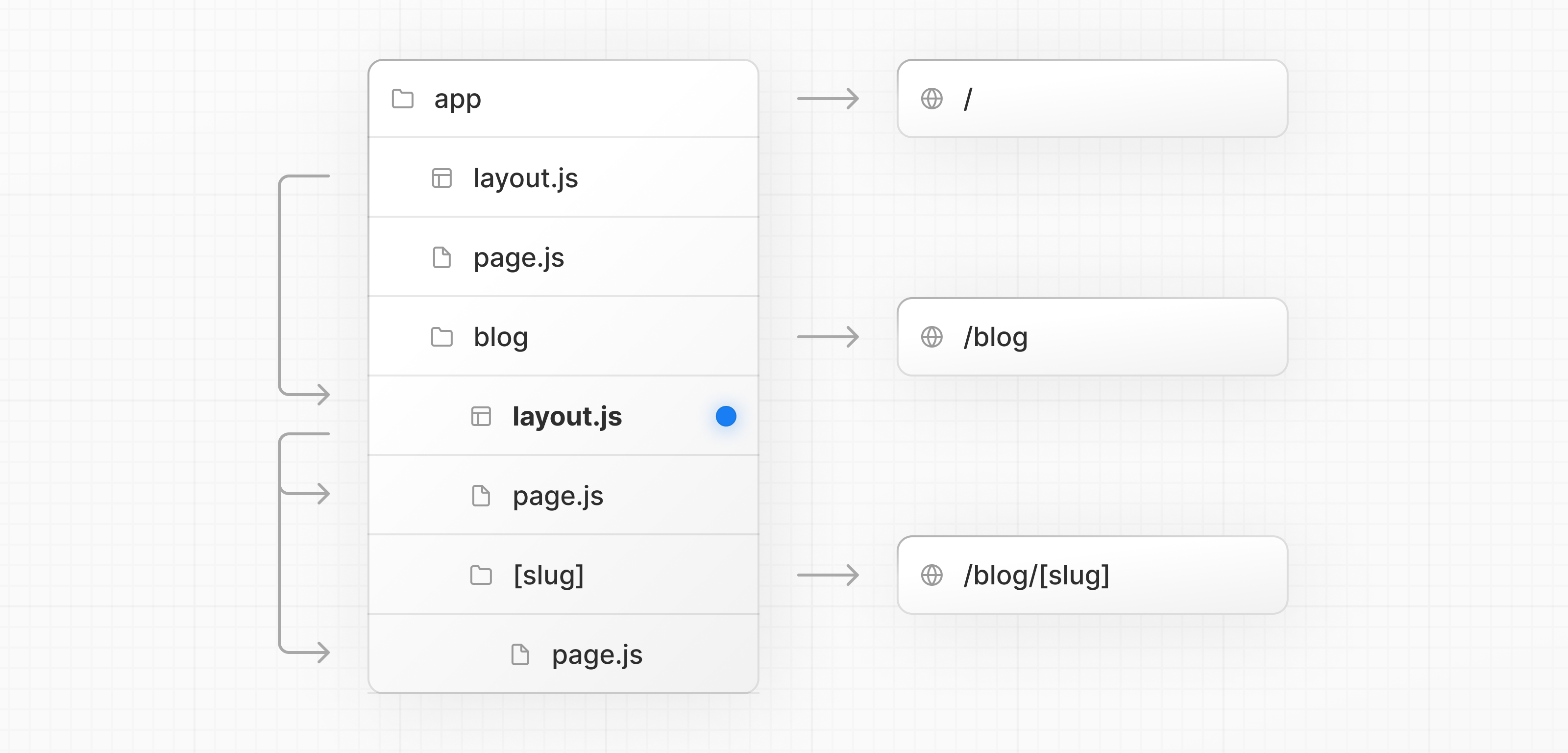
By default, layouts in the folder hierarchy are also nested, which means they wrap child layouts via their `children` prop. You can nest layouts by adding `layout` inside specific route segments (folders).
For example, to create a layout for the `/blog` route, add a new `layout` file inside the `blog` folder.
```tsx filename="app/blog/layout.tsx" switcher
export default function BlogLayout({
children,
}: {
children: React.ReactNode
}) {
return {children}
}
```
```jsx filename="app/blog/layout.js" switcher
export default function BlogLayout({ children }) {
return {children}
}
```
If you were to combine the two layouts above, the root layout (`app/layout.js`) would wrap the blog layout (`app/blog/layout.js`), which would wrap the blog (`app/blog/page.js`) and blog post page (`app/blog/[slug]/page.js`).
## Creating a dynamic segment
[Dynamic segments](/docs/app/api-reference/file-conventions/dynamic-routes) allow you to create routes that are generated from data. For example, instead of manually creating a route for each individual blog post, you can create a dynamic segment to generate the routes based on blog post data.
To create a dynamic segment, wrap the segment (folder) name in square brackets: `[segmentName]`. For example, in the `app/blog/[slug]/page.tsx` route, the `[slug]` is the dynamic segment.
```tsx filename="app/blog/[slug]/page.tsx" switcher
export default async function BlogPostPage({
params,
}: {
params: Promise<{ slug: string }>
}) {
const { slug } = await params
const post = await getPost(slug)
return (
)
}
```
Learn more about [Dynamic Segments](/docs/app/api-reference/file-conventions/dynamic-routes) and the [`params`](/docs/app/api-reference/file-conventions/page#params-optional) props.
Nested [layouts within Dynamic Segments](/docs/app/api-reference/file-conventions/layout#params-optional), can also access the `params` props.
## Rendering with search params
In a Server Component **page**, you can access search parameters using the [`searchParams`](/docs/app/api-reference/file-conventions/page#searchparams-optional) prop:
```tsx filename="app/page.tsx" switcher
export default async function Page({
searchParams,
}: {
searchParams: Promise<{ [key: string]: string | string[] | undefined }>
}) {
const filters = (await searchParams).filters
}
```
```jsx filename="app/page.jsx" switcher
export default async function Page({ searchParams }) {
const filters = (await searchParams).filters
}
```
Using `searchParams` opts your page into [**dynamic rendering**](/docs/app/glossary#dynamic-rendering) because it requires an incoming request to read the search parameters from.
Client Components can read search params using the [`useSearchParams`](/docs/app/api-reference/functions/use-search-params) hook.
Learn more about `useSearchParams` in [prerendered](/docs/app/api-reference/functions/use-search-params#prerendering) and [dynamically rendered](/docs/app/api-reference/functions/use-search-params#dynamic-rendering) routes.
### What to use and when
* Use the `searchParams` prop when you need search parameters to **load data for the page** (e.g. pagination, filtering from a database).
* Use `useSearchParams` when search parameters are used **only on the client** (e.g. filtering a list already loaded via props).
* As a small optimization, you can use `new URLSearchParams(window.location.search)` in **callbacks or event handlers** to read search params without triggering re-renders.
## Linking between pages
You can use the [`` component](/docs/app/api-reference/components/link) to navigate between routes. `` is a built-in Next.js component that extends the HTML `` tag to provide [prefetching](/docs/app/getting-started/linking-and-navigating#prefetching) and [client-side navigation](/docs/app/getting-started/linking-and-navigating#client-side-transitions).
For example, to generate a list of blog posts, import `` from `next/link` and pass a `href` prop to the component:
```tsx filename="app/ui/post.tsx" highlight={1,10} switcher
import Link from 'next/link'
export default async function Post({ post }) {
const posts = await getPosts()
return (