---
title: error.js
description: API reference for the error.js special file.
url: "https://nextjs.org/docs/app/api-reference/file-conventions/error"
version: 16.2.2
lastUpdated: 2026-04-02
prerequisites:
- "API Reference: /docs/app/api-reference"
- "File-system conventions: /docs/app/api-reference/file-conventions"
related:
- app/getting-started/error-handling
---
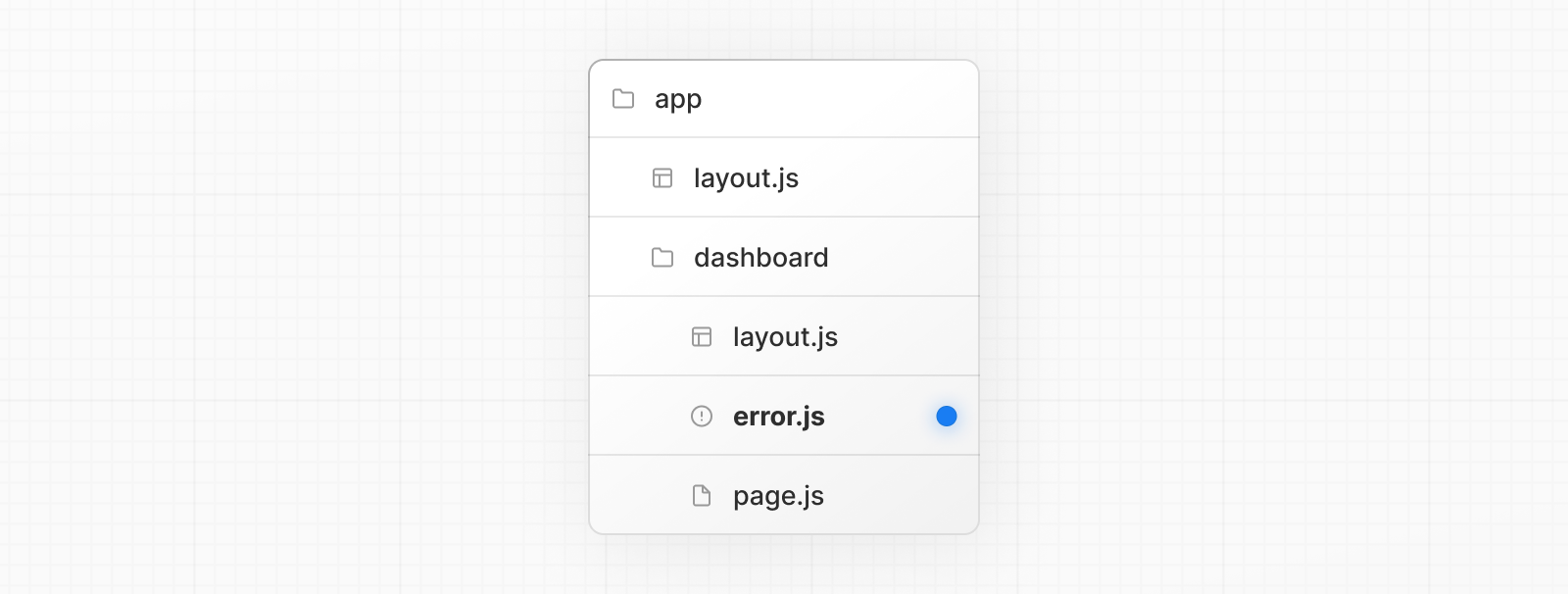
An **error** file allows you to handle unexpected runtime errors and display fallback UI.
```tsx filename="app/dashboard/error.tsx" switcher
'use client' // Error boundaries must be Client Components
import { useEffect } from 'react'
export default function Error({
error,
unstable_retry,
}: {
error: Error & { digest?: string }
unstable_retry: () => void
}) {
useEffect(() => {
// Log the error to an error reporting service
console.error(error)
}, [error])
return (
Something went wrong!
)
}
```
```jsx filename="app/dashboard/error.js" switcher
'use client' // Error boundaries must be Client Components
import { useEffect } from 'react'
export default function Error({ error, unstable_retry }) {
useEffect(() => {
// Log the error to an error reporting service
console.error(error)
}, [error])
return (
Something went wrong!
)
}
```
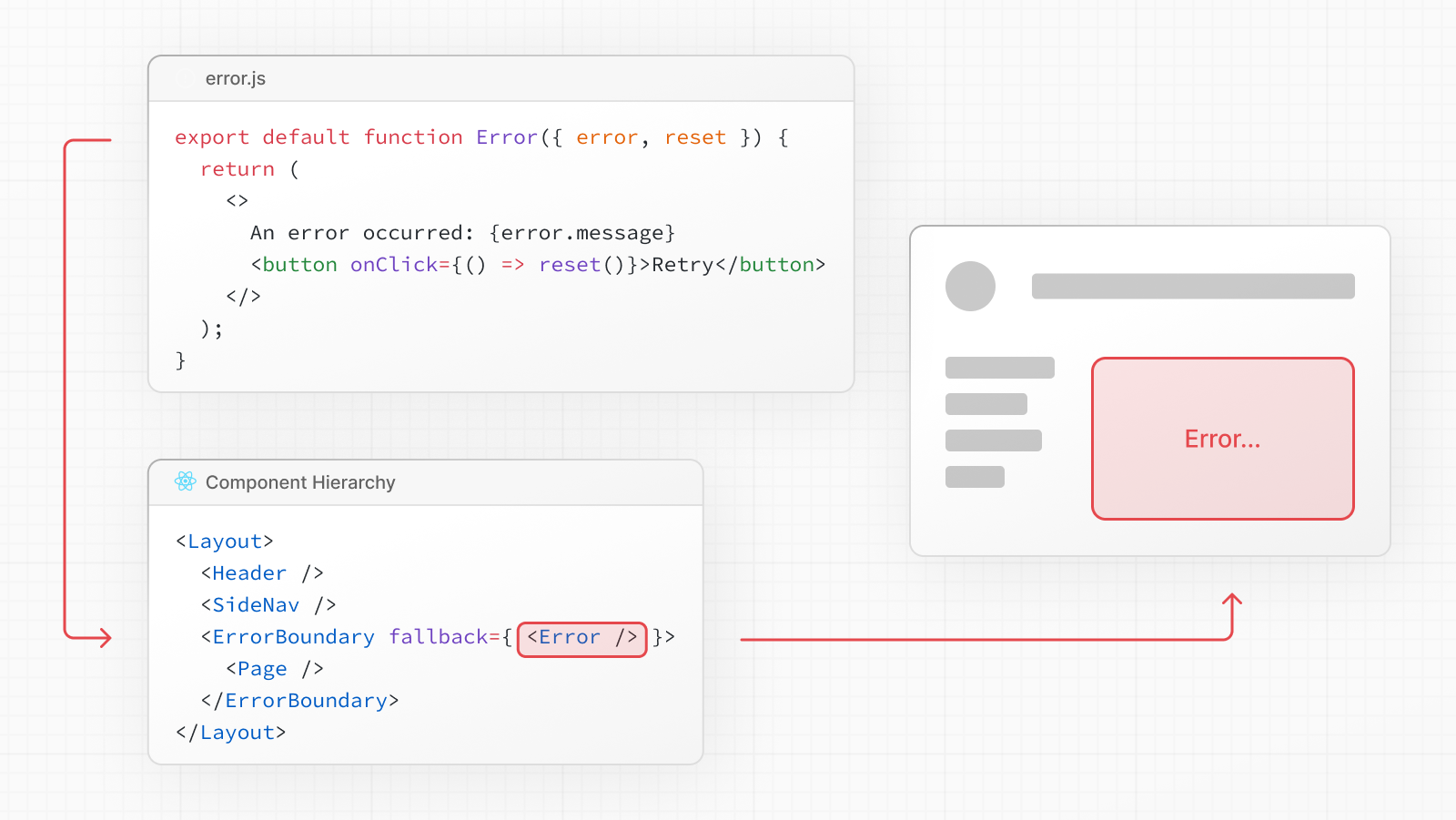
`error.js` wraps a route segment and its nested children in a [React Error Boundary](https://react.dev/reference/react/Component#catching-rendering-errors-with-an-error-boundary). When an error throws within the boundary, the `error` component shows as the fallback UI.
> **Good to know**:
>
> * The [React DevTools](https://react.dev/learn/react-developer-tools) allow you to toggle error boundaries to test error states.
> * If you want errors to bubble up to the parent error boundary, you can `throw` when rendering the `error` component.
> * For component-level error recovery that aren't tied to route segments like [`error.js`](/docs/app/api-reference/file-conventions/error), use the [`unstable_catchError`](/docs/app/api-reference/functions/catchError) function.
In the [component hierarchy](/docs/app/getting-started/project-structure#component-hierarchy), `error.js` wraps `loading.js`, `not-found.js`, `page.js`, and nested `layout.js` files in a React error boundary. It does **not** wrap the `layout.js` or `template.js` above it in the same segment. To handle errors in the root layout, use [`global-error.js`](/docs/app/api-reference/file-conventions/error#global-error).
## Reference
### Props
#### `error`
An instance of an [`Error`](https://developer.mozilla.org/docs/Web/JavaScript/Reference/Global_Objects/Error) object forwarded to the `error.js` Client Component.
> **Good to know:** During development, the `Error` object forwarded to the client will be serialized and include the `message` of the original error for easier debugging. However, **this behavior is different in production** to avoid leaking potentially sensitive details included in the error to the client.
#### `error.message`
* Errors forwarded from Client Components show the original `Error` message.
* Errors forwarded from Server Components show a generic message with an identifier. This is to prevent leaking sensitive details. You can use the identifier, under `errors.digest`, to match the corresponding server-side logs.
#### `error.digest`
An automatically generated hash of the error thrown. It can be used to match the corresponding error in server-side logs.
#### `unstable_retry`
The cause of an error can sometimes be temporary. In these cases, trying again might resolve the issue.
An error component can use the `unstable_retry()` function to prompt the user to attempt to recover from the error. When executed, the function will try to re-fetch and re-render the error boundary's children. If successful, the fallback error component is replaced with the result of the re-render.
```tsx filename="app/dashboard/error.tsx" switcher
'use client' // Error boundaries must be Client Components
export default function Error({
error,
unstable_retry,
}: {
error: Error & { digest?: string }
unstable_retry: () => void
}) {
return (
Something went wrong!
)
}
```
```jsx filename="app/dashboard/error.js" switcher
'use client' // Error boundaries must be Client Components
export default function Error({ error, unstable_retry }) {
return (
Something went wrong!
)
}
```
#### `reset`
In most cases, you should use [`unstable_retry()`](#unstable_retry) instead. However, if you have a specific reason to clear the error state and re-render the error boundary's children without re-fetching the contents, you can use the `reset()` function.
## Examples
### Global Error
While less common, you can handle errors in the root layout or template using `global-error.jsx`, located in the root app directory, even when leveraging [internationalization](/docs/app/guides/internationalization). Global error UI must define its own `` and `` tags, global styles, fonts, or other dependencies that your error page requires. This file replaces the root layout or template when active.
> **Good to know**: Error boundaries must be [Client Components](/docs/app/getting-started/server-and-client-components#using-client-components), which means that [`metadata` and `generateMetadata`](/docs/app/getting-started/metadata-and-og-images) exports are not supported in `global-error.jsx`. As an alternative, you can use the React [``](https://react.dev/reference/react-dom/components/title) component.
```tsx filename="app/global-error.tsx" switcher
'use client' // Error boundaries must be Client Components
export default function GlobalError({
error,
unstable_retry,
}: {
error: Error & { digest?: string }
unstable_retry: () => void
}) {
return (
// global-error must include html and body tags
<html>
<body>
<h2>Something went wrong!</h2>
<button onClick={() => unstable_retry()}>Try again</button>
</body>
</html>
)
}
```
```jsx filename="app/global-error.js" switcher
'use client' // Error boundaries must be Client Components
export default function GlobalError({ error, unstable_retry }) {
return (
// global-error must include html and body tags
<html>
<body>
<h2>Something went wrong!</h2>
<button onClick={() => unstable_retry()}>Try again</button>
</body>
</html>
)
}
```
### Graceful error recovery with a custom error boundary
When rendering fails on the client, it can be useful to show the last known server rendered UI for a better user experience.
The `GracefullyDegradingErrorBoundary` is an example of a custom error boundary that captures and preserves the current HTML before an error occurs. If a rendering error happens, it re-renders the captured HTML and displays a persistent notification bar to inform the user.
```tsx filename="app/dashboard/error.tsx" switcher
'use client'
import React, { Component, ErrorInfo, ReactNode } from 'react'
interface ErrorBoundaryProps {
children: ReactNode
onError?: (error: Error, errorInfo: ErrorInfo) => void
}
interface ErrorBoundaryState {
hasError: boolean
}
export class GracefullyDegradingErrorBoundary extends Component<
ErrorBoundaryProps,
ErrorBoundaryState
> {
private contentRef: React.RefObject<HTMLDivElement | null>
constructor(props: ErrorBoundaryProps) {
super(props)
this.state = { hasError: false }
this.contentRef = React.createRef()
}
static getDerivedStateFromError(_: Error): ErrorBoundaryState {
return { hasError: true }
}
componentDidCatch(error: Error, errorInfo: ErrorInfo) {
if (this.props.onError) {
this.props.onError(error, errorInfo)
}
}
render() {
if (this.state.hasError) {
// Render the current HTML content without hydration
return (
<>
<div
ref={this.contentRef}
suppressHydrationWarning
dangerouslySetInnerHTML={{
__html: this.contentRef.current?.innerHTML || '',
}}
/>
<div className="fixed bottom-0 left-0 right-0 bg-red-600 text-white py-4 px-6 text-center">
<p className="font-semibold">
An error occurred during page rendering
</p>
</div>
</>
)
}
return <div ref={this.contentRef}>{this.props.children}</div>
}
}
export default GracefullyDegradingErrorBoundary
```
```jsx filename="app/dashboard/error.js" switcher
'use client'
import React, { Component, createRef } from 'react'
class GracefullyDegradingErrorBoundary extends Component {
constructor(props) {
super(props)
this.state = { hasError: false }
this.contentRef = createRef()
}
static getDerivedStateFromError(_) {
return { hasError: true }
}
componentDidCatch(error, errorInfo) {
if (this.props.onError) {
this.props.onError(error, errorInfo)
}
}
render() {
if (this.state.hasError) {
// Render the current HTML content without hydration
return (
<>
<div
ref={this.contentRef}
suppressHydrationWarning
dangerouslySetInnerHTML={{
__html: this.contentRef.current?.innerHTML || '',
}}
/>
<div className="fixed bottom-0 left-0 right-0 bg-red-600 text-white py-4 px-6 text-center">
<p className="font-semibold">
An error occurred during page rendering
</p>
</div>
</>
)
}
return <div ref={this.contentRef}>{this.props.children}</div>
}
}
export default GracefullyDegradingErrorBoundary
```
## Version History
| Version | Changes |
| --------- | ------------------------------------------- |
| `v16.2.0` | `unstable_retry` prop added. |
| `v15.2.0` | Also display `global-error` in development. |
| `v13.1.0` | `global-error` introduced. |
| `v13.0.0` | `error` introduced. |
## Learn more about error handling- [Error Handling](/docs/app/getting-started/error-handling)
- Learn how to display expected errors and handle uncaught exceptions.
---
For a semantic overview of all documentation, see [/docs/sitemap.md](/docs/sitemap.md)
For an index of all available documentation, see [/docs/llms.txt](/docs/llms.txt)