---
title: How to use markdown and MDX in Next.js
description: Learn how to configure MDX and use it in your Next.js apps.
url: "https://nextjs.org/docs/app/guides/mdx"
version: 16.2.2
lastUpdated: 2026-04-02
prerequisites:
- "Guides: /docs/app/guides"
---
[Markdown](https://daringfireball.net/projects/markdown/syntax) is a lightweight markup language used to format text. It allows you to write using plain text syntax and convert it to structurally valid HTML. It's commonly used for writing content on websites and blogs.
You write...
```md
I **love** using [Next.js](https://nextjs.org/)
```
Output:
```html
I love using Next.js
```
[MDX](https://mdxjs.com/) is a superset of markdown that lets you write [JSX](https://react.dev/learn/writing-markup-with-jsx) directly in your markdown files. It is a powerful way to add dynamic interactivity and embed React components within your content.
Next.js can support both local MDX content inside your application, as well as remote MDX files fetched dynamically on the server. The Next.js plugin handles transforming markdown and React components into HTML, including support for usage in Server Components (the default in App Router).
> **Good to know**: View the [Portfolio Starter Kit](https://vercel.com/templates/next.js/portfolio-starter-kit) template for a complete working example.
## Install dependencies
The `@next/mdx` package, and related packages, are used to configure Next.js so it can process markdown and MDX. **It sources data from local files**, allowing you to create pages with a `.md` or `.mdx` extension, directly in your `/pages` or `/app` directory.
Install these packages to render MDX with Next.js:
```bash package="pnpm"
pnpm add @next/mdx @mdx-js/loader @mdx-js/react @types/mdx
```
```bash package="npm"
npm install @next/mdx @mdx-js/loader @mdx-js/react @types/mdx
```
```bash package="yarn"
yarn add @next/mdx @mdx-js/loader @mdx-js/react @types/mdx
```
```bash package="bun"
bun add @next/mdx @mdx-js/loader @mdx-js/react @types/mdx
```
## Configure `next.config.mjs`
Update the `next.config.mjs` file at your project's root to configure it to use MDX:
```js filename="next.config.mjs"
import createMDX from '@next/mdx'
/** @type {import('next').NextConfig} */
const nextConfig = {
// Configure `pageExtensions` to include markdown and MDX files
pageExtensions: ['js', 'jsx', 'md', 'mdx', 'ts', 'tsx'],
// Optionally, add any other Next.js config below
}
const withMDX = createMDX({
// Add markdown plugins here, as desired
})
// Merge MDX config with Next.js config
export default withMDX(nextConfig)
```
This allows `.mdx` files to act as pages, routes, or imports in your application.
### Handling `.md` files
By default, `next/mdx` only compiles files with the `.mdx` extension. To handle `.md` files with webpack, update the `extension` option:
```js filename="next.config.mjs"
const withMDX = createMDX({
extension: /\.(md|mdx)$/,
})
```
## Add an `mdx-components.tsx` file
Create an `mdx-components.tsx` (or `.js`) file in the root of your project to define global MDX Components. For example, at the same level as `pages` or `app`, or inside `src` if applicable.
```tsx filename="mdx-components.tsx" switcher
import type { MDXComponents } from 'mdx/types'
const components: MDXComponents = {}
export function useMDXComponents(): MDXComponents {
return components
}
```
```js filename="mdx-components.js" switcher
const components = {}
export function useMDXComponents() {
return components
}
```
> **Good to know**:
>
> * `mdx-components.tsx` is **required** to use `@next/mdx` with App Router and will not work without it.
> * Learn more about the [`mdx-components.tsx` file convention](/docs/app/api-reference/file-conventions/mdx-components).
> * Learn how to [use custom styles and components](#using-custom-styles-and-components).
## Rendering MDX
You can render MDX using Next.js's file based routing or by importing MDX files into other pages.
### Using file based routing
When using file based routing, you can use MDX pages like any other page.
In App Router apps, that includes being able to use [metadata](/docs/app/getting-started/metadata-and-og-images).
Create a new MDX page within the `/app` directory:
```txt
my-project
├── app
│ └── mdx-page
│ └── page.(mdx/md)
|── mdx-components.(tsx/js)
└── package.json
```
You can use MDX in these files, and even import React components, directly inside your MDX page:
```mdx
import { MyComponent } from 'my-component'
# Welcome to my MDX page!
This is some **bold** and _italics_ text.
This is a list in markdown:
- One
- Two
- Three
Checkout my React component:
```
Navigating to the `/mdx-page` route should display your rendered MDX page.
### Using imports
Create a new page within the `/app` directory and an MDX file wherever you'd like:
```txt
.
├── app/
│ └── mdx-page/
│ └── page.(tsx/js)
├── markdown/
│ └── welcome.(mdx/md)
├── mdx-components.(tsx/js)
└── package.json
```
You can use MDX in these files, and even import React components, directly inside your MDX page:
```mdx filename="markdown/welcome.mdx" switcher
import { MyComponent } from 'my-component'
# Welcome to my MDX page!
This is some **bold** and _italics_ text.
This is a list in markdown:
- One
- Two
- Three
Checkout my React component:
```
Import the MDX file inside the page to display the content:
```tsx filename="app/mdx-page/page.tsx" switcher
import Welcome from '@/markdown/welcome.mdx'
export default function Page() {
return
}
```
```jsx filename="app/mdx-page/page.js" switcher
import Welcome from '@/markdown/welcome.mdx'
export default function Page() {
return
}
```
Navigating to the `/mdx-page` route should display your rendered MDX page.
### Using dynamic imports
You can import dynamic MDX components instead of using filesystem routing for MDX files.
For example, you can have a dynamic route segment which loads MDX components from a separate directory:
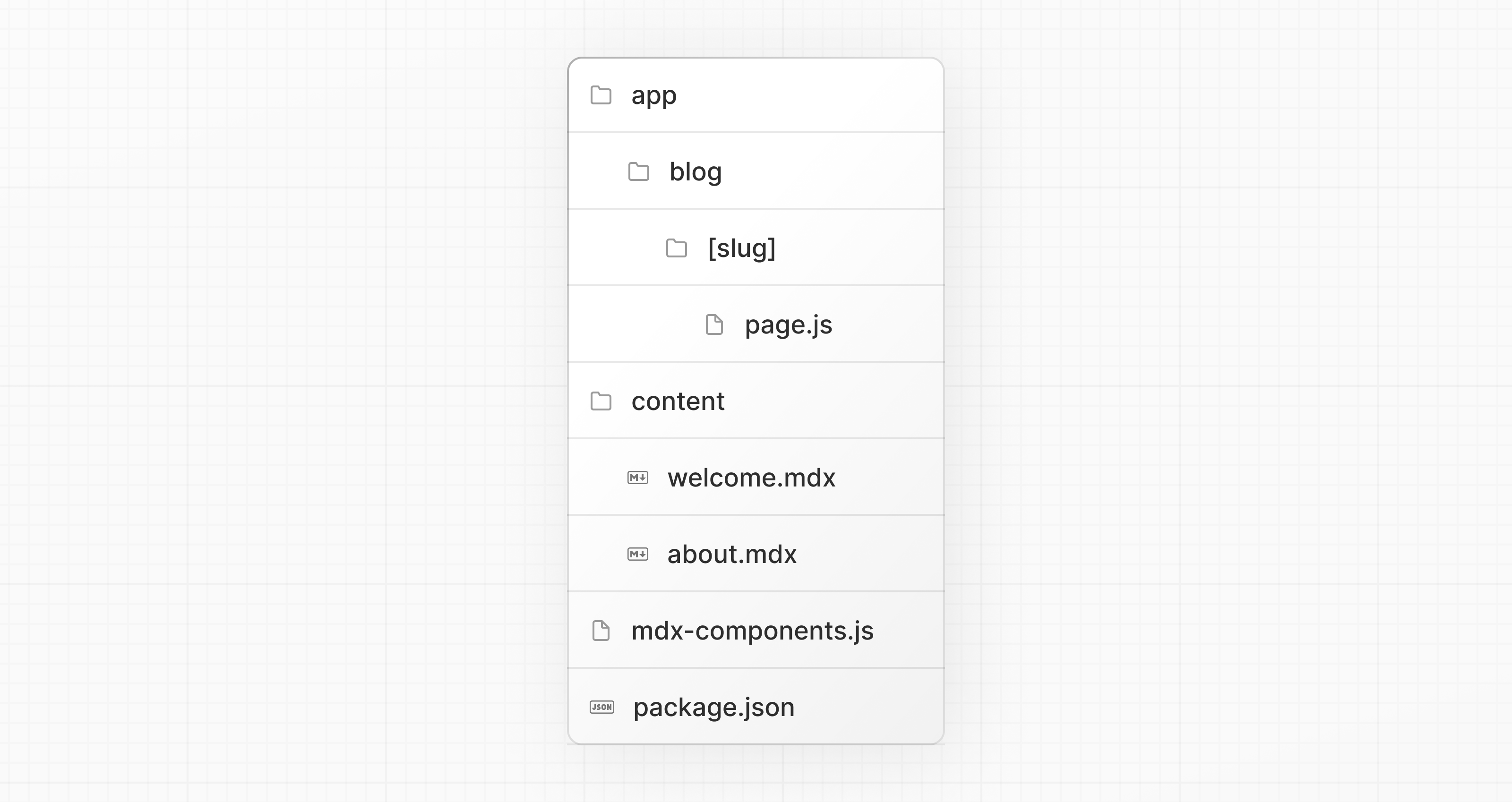
[`generateStaticParams`](/docs/app/api-reference/functions/generate-static-params) can be used to prerender the provided routes. By marking `dynamicParams` as `false`, accessing a route not defined in `generateStaticParams` will 404.
```tsx filename="app/blog/[slug]/page.tsx" switcher
export default async function Page({
params,
}: {
params: Promise<{ slug: string }>
}) {
const { slug } = await params
const { default: Post } = await import(`@/content/${slug}.mdx`)
return
}
export function generateStaticParams() {
return [{ slug: 'welcome' }, { slug: 'about' }]
}
export const dynamicParams = false
```
```jsx filename="app/blog/[slug]/page.js" switcher
export default async function Page({ params }) {
const { slug } = await params
const { default: Post } = await import(`@/content/${slug}.mdx`)
return
}
export function generateStaticParams() {
return [{ slug: 'welcome' }, { slug: 'about' }]
}
export const dynamicParams = false
```
> **Good to know**: Ensure you specify the `.mdx` file extension in your import. While it is not required to use [module path aliases](/docs/app/getting-started/installation#set-up-absolute-imports-and-module-path-aliases) (e.g., `@/content`), it does simplify your import path.
## Using custom styles and components
Markdown, when rendered, maps to native HTML elements. For example, writing the following markdown:
```md
## This is a heading
This is a list in markdown:
- One
- Two
- Three
```
Generates the following HTML:
```html
This is a heading
This is a list in markdown:
```
To style your markdown, you can provide custom components that map to the generated HTML elements. Styles and components can be implemented globally, locally, and with shared layouts.
### Global styles and components
Adding styles and components in `mdx-components.tsx` will affect *all* MDX files in your application.
```tsx filename="mdx-components.tsx" switcher
import type { MDXComponents } from 'mdx/types'
import Image, { ImageProps } from 'next/image'
// This file allows you to provide custom React components
// to be used in MDX files. You can import and use any
// React component you want, including inline styles,
// components from other libraries, and more.
const components = {
// Allows customizing built-in components, e.g. to add styling.
h1: ({ children }) => (
{children}
),
img: (props) => (
),
} satisfies MDXComponents
export function useMDXComponents(): MDXComponents {
return components
}
```
```js filename="mdx-components.js" switcher
import Image from 'next/image'
// This file allows you to provide custom React components
// to be used in MDX files. You can import and use any
// React component you want, including inline styles,
// components from other libraries, and more.
const components = {
// Allows customizing built-in components, e.g. to add styling.
h1: ({ children }) => (
{children}
),
img: (props) => (
),
}
export function useMDXComponents() {
return components
}
```
### Local styles and components
You can apply local styles and components to specific pages by passing them into imported MDX components. These will merge with and override [global styles and components](#global-styles-and-components).
```tsx filename="app/mdx-page/page.tsx" switcher
import Welcome from '@/markdown/welcome.mdx'
function CustomH1({ children }) {
return {children}
}
const overrideComponents = {
h1: CustomH1,
}
export default function Page() {
return
}
```
```jsx filename="app/mdx-page/page.js" switcher
import Welcome from '@/markdown/welcome.mdx'
function CustomH1({ children }) {
return {children}
}
const overrideComponents = {
h1: CustomH1,
}
export default function Page() {
return
}
```
### Shared layouts
To share a layout across MDX pages, you can use the [built-in layouts support](/docs/app/api-reference/file-conventions/layout) with the App Router.
```tsx filename="app/mdx-page/layout.tsx" switcher
export default function MdxLayout({ children }: { children: React.ReactNode }) {
// Create any shared layout or styles here
return {children}
}
```
```jsx filename="app/mdx-page/layout.js" switcher
export default function MdxLayout({ children }) {
// Create any shared layout or styles here
return {children}
}
```
### Using Tailwind typography plugin
If you are using [Tailwind](https://tailwindcss.com) to style your application, using the [`@tailwindcss/typography` plugin](https://tailwindcss.com/docs/plugins#typography) will allow you to reuse your Tailwind configuration and styles in your markdown files.
The plugin adds a set of `prose` classes that can be used to add typographic styles to content blocks that come from sources, like markdown.
[Install Tailwind typography](https://github.com/tailwindlabs/tailwindcss-typography?tab=readme-ov-file#installation) and use with [shared layouts](#shared-layouts) to add the `prose` you want.
```tsx filename="app/mdx-page/layout.tsx" switcher
export default function MdxLayout({ children }: { children: React.ReactNode }) {
// Create any shared layout or styles here
return (
{children}
)
}
```
```jsx filename="app/mdx-page/layout.js" switcher
export default function MdxLayout({ children }) {
// Create any shared layout or styles here
return (
{children}
)
}
```
## Frontmatter
Frontmatter is a YAML like key/value pairing that can be used to store data about a page. `@next/mdx` does **not** support frontmatter by default, though there are many solutions for adding frontmatter to your MDX content, such as:
* [remark-frontmatter](https://github.com/remarkjs/remark-frontmatter)
* [remark-mdx-frontmatter](https://github.com/remcohaszing/remark-mdx-frontmatter)
* [gray-matter](https://github.com/jonschlinkert/gray-matter)
`@next/mdx` **does** allow you to use exports like any other JavaScript component:
```mdx filename="content/blog-post.mdx" switcher
export const metadata = {
author: 'John Doe',
}
# Blog post
```
Metadata can now be referenced outside of the MDX file:
```tsx filename="app/blog/page.tsx" switcher
import BlogPost, { metadata } from '@/content/blog-post.mdx'
export default function Page() {
console.log('metadata: ', metadata)
//=> { author: 'John Doe' }
return
}
```
```jsx filename="app/blog/page.js" switcher
import BlogPost, { metadata } from '@/content/blog-post.mdx'
export default function Page() {
console.log('metadata: ', metadata)
//=> { author: 'John Doe' }
return
}
```
A common use case for this is when you want to iterate over a collection of MDX and extract data. For example, creating a blog index page from all blog posts. You can use packages like [Node's `fs` module](https://nodejs.org/api/fs.html) or [globby](https://www.npmjs.com/package/globby) to read a directory of posts and extract the metadata.
> **Good to know**:
>
> * Using `fs`, `globby`, etc. can only be used server-side.
> * View the [Portfolio Starter Kit](https://vercel.com/templates/next.js/portfolio-starter-kit) template for a complete working example.
## remark and rehype Plugins
You can optionally provide remark and rehype plugins to transform the MDX content.
For example, you can use [`remark-gfm`](https://github.com/remarkjs/remark-gfm) to support GitHub Flavored Markdown.
Since the remark and rehype ecosystem is ESM only, you'll need to use `next.config.mjs` or `next.config.ts` as the configuration file.
```js filename="next.config.mjs"
import remarkGfm from 'remark-gfm'
import createMDX from '@next/mdx'
/** @type {import('next').NextConfig} */
const nextConfig = {
// Allow .mdx extensions for files
pageExtensions: ['js', 'jsx', 'md', 'mdx', 'ts', 'tsx'],
// Optionally, add any other Next.js config below
}
const withMDX = createMDX({
// Add markdown plugins here, as desired
options: {
remarkPlugins: [remarkGfm],
rehypePlugins: [],
},
})
// Combine MDX and Next.js config
export default withMDX(nextConfig)
```
### Using Plugins with Turbopack
To use plugins with [Turbopack](/docs/app/api-reference/turbopack), upgrade to the latest `@next/mdx` and specify plugin names using a string:
```js filename="next.config.mjs"
import createMDX from '@next/mdx'
/** @type {import('next').NextConfig} */
const nextConfig = {
pageExtensions: ['js', 'jsx', 'md', 'mdx', 'ts', 'tsx'],
}
const withMDX = createMDX({
options: {
remarkPlugins: [
// Without options
'remark-gfm',
// With options
['remark-toc', { heading: 'The Table' }],
],
rehypePlugins: [
// Without options
'rehype-slug',
// With options
['rehype-katex', { strict: true, throwOnError: true }],
],
},
})
export default withMDX(nextConfig)
```
> **Good to know**:
>
> remark and rehype plugins without serializable options cannot be used yet with [Turbopack](/docs/app/api-reference/turbopack), because JavaScript functions can't be passed to Rust.
## Deep Dive: How do you transform markdown into HTML?
React does not natively understand markdown. The markdown plaintext needs to first be transformed into HTML. This can be accomplished with `remark` and `rehype`.
`remark` is an ecosystem of tools around markdown. `rehype` is the same, but for HTML. For example, the following code snippet transforms markdown into HTML:
```js
import { unified } from 'unified'
import remarkParse from 'remark-parse'
import remarkRehype from 'remark-rehype'
import rehypeSanitize from 'rehype-sanitize'
import rehypeStringify from 'rehype-stringify'
main()
async function main() {
const file = await unified()
.use(remarkParse) // Convert into markdown AST
.use(remarkRehype) // Transform to HTML AST
.use(rehypeSanitize) // Sanitize HTML input
.use(rehypeStringify) // Convert AST into serialized HTML
.process('Hello, Next.js!')
console.log(String(file)) // Hello, Next.js!
}
```
The `remark` and `rehype` ecosystem contains plugins for [syntax highlighting](https://github.com/atomiks/rehype-pretty-code), [linking headings](https://github.com/rehypejs/rehype-autolink-headings), [generating a table of contents](https://github.com/remarkjs/remark-toc), and more.
When using `@next/mdx` as shown above, you **do not** need to use `remark` or `rehype` directly, as it is handled for you. We're describing it here for a deeper understanding of what the `@next/mdx` package is doing underneath.
## Using the Rust-based MDX compiler (experimental)
Next.js supports a new MDX compiler written in Rust. This compiler is still experimental and is not recommended for production use. To use the new compiler, you need to configure `next.config.js` when you pass it to `withMDX`:
```js filename="next.config.js"
module.exports = withMDX({
experimental: {
mdxRs: true,
},
})
```
`mdxRs` also accepts an object to configure how to transform mdx files.
```js filename="next.config.js"
module.exports = withMDX({
experimental: {
mdxRs: {
jsxRuntime?: string // Custom jsx runtime
jsxImportSource?: string // Custom jsx import source,
mdxType?: 'gfm' | 'commonmark' // Configure what kind of mdx syntax will be used to parse & transform
},
},
})
```
## Helpful Links
* [MDX](https://mdxjs.com)
* [`@next/mdx`](https://www.npmjs.com/package/@next/mdx)
* [remark](https://github.com/remarkjs/remark)
* [rehype](https://github.com/rehypejs/rehype)
* [Markdoc](https://markdoc.dev/docs/nextjs)
---
For a semantic overview of all documentation, see [/docs/sitemap.md](/docs/sitemap.md)
For an index of all available documentation, see [/docs/llms.txt](/docs/llms.txt)